Description
This tool copies selected objects and automatically increments any numeric value found within the selected text by 1 for each copy.
- Auto-Increment Copying
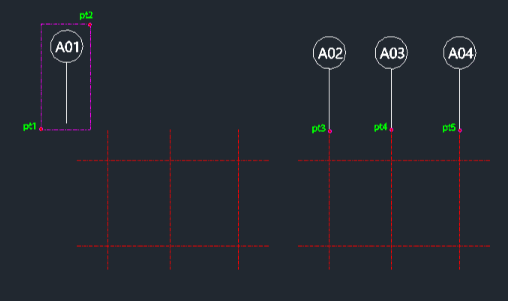
- Perfect for creating sequential labels or numbered parts. Select the objects once, then click multiple locations to place copies with numbers increasing (e.g., A1 -> A2 -> A3).
- Mixed Content
- Works with text strings containing both letters and numbers.
How to use
The number in the text will increase by 1 for each new copy placed.
- 1.Type copyp in the command line and press Enter.
- 2.Select the objects to copy (including the text) using a selection window (click PT1 then PT2).
- 3.Click the Base Point for the copy.
- 4.Click subsequent Target Points (PT3, PT4, PT5...) to place copies.
Example
Included free
All 401 LISP utilities come free with every Cadopilar license.
Purchase any Cadopilar license and our team will install the complete suite for you. No additional charge, no setup headaches.
Contact us to get started →