LISP Utilities
TABLE3table3.elfDraw Table (Window)
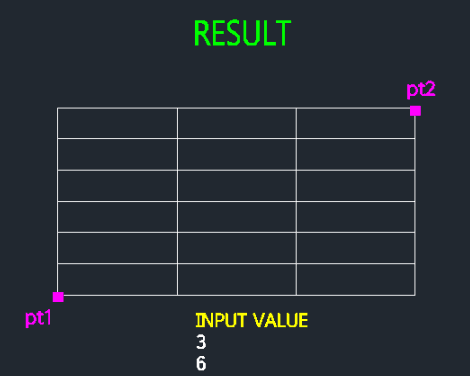
Generates a table based on the specified bottom-left and top-right corner points, along with column and row counts.
Description
This tool automatically generates a table (grid) by defining its overall boundary area.
- Area-Based Generation
- Instead of defining row heights manually (like TABLE2), you specify the total area (Bottom-Left to Top-Right), and the tool automatically calculates the cell sizes to fit.
- Quick Layout
- Ideal for fitting a table exactly into a specific empty space on your drawing.
How to use
The tool automatically divides the specified area into equal cells to create the table.
- 1.Type TABLE3 in the command line and press Enter.
- 2.Specify the Bottom-Left corner of the table.
- 3.Specify the Top-Right corner of the table.
- 4.Enter the number of Columns (Horizontal count).
- 5.Enter the number of Rows (Vertical count).
Example
Included free
All 401 LISP utilities come free with every Cadopilar license.
Purchase any Cadopilar license and our team will install the complete suite for you. No additional charge, no setup headaches.
Contact us to get started →