LISP Utilities
TTEXTttext.elfFit Text to Cell
Enables text entry within a table with automatic fit-to-context line spacing adjustment.
Description
This tool streamlines the process of filling out table rows with text.
- Auto-Spacing
- Automatically calculates the vertical spacing based on your input, allowing you to type continuously without manually clicking the next cell.
- Context-Aware
- Designed specifically for entering data into existing grids or tables generated by tools such as TABLE2 or TABLE3.
How to use
.
The cursor will automatically jump to the next cell down.
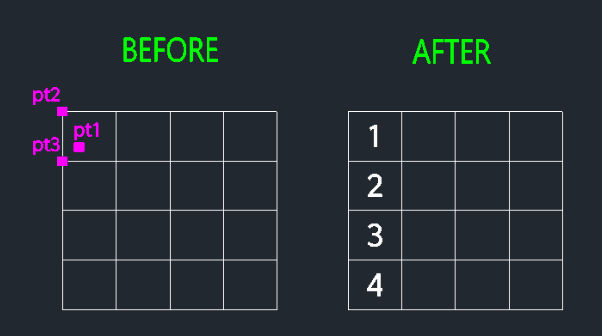
- 1.Type TTEXT in the command line and press Enter.
- 2.Specify the Start Point for the text inside the very first (top) cell.
- 3.Specify the Text Height (Type a value or click two points).
- 4.Specify the Vertical Interval (Row Height).
- 5.Type your text content and press Enter.
- 6.Repeat this to fill the column.
- 7.Press ESC to finish.
- Tip
- Click the start point and the equivalent point in the cell directly below it. The tool automatically enables OSNAP to help you snap to intersections or endpoints.
Example
Included free
All 401 LISP utilities come free with every Cadopilar license.
Purchase any Cadopilar license and our team will install the complete suite for you. No additional charge, no setup headaches.
Contact us to get started →