Description
This tool simplifies the Stretch command by reducing the required number of clicks from typically six to just three clicks.
- Efficiency
- It streamlines the process by allowing you to define the selection window and the stretch destination in a single flow.
- Compatibility
- This is a dedicated Cadopilar Lisp tool and works only within Cadopilar.
How to use
Perform the stretch:
- 1.Type stc in the command line and press Enter.
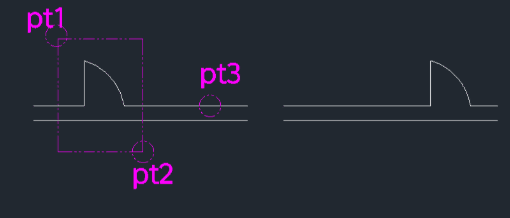
- 2.Click First Point (pt1) and Second Point (pt2) to define the crossing selection window around the object you want to stretch.
- Method A (Click)
- Click the Target Point (pt3). The objects will stretch from the midpoint of the selection window to this new point.
- Method B (Value Input)
- Ensure F12 (Dynamic Input) is ON, move the cursor to set the direction, and type the Distance Value to stretch by a specific amount.
Example
Included free
All 401 LISP utilities come free with every Cadopilar license.
Purchase any Cadopilar license and our team will install the complete suite for you. No additional charge, no setup headaches.
Contact us to get started →