Description
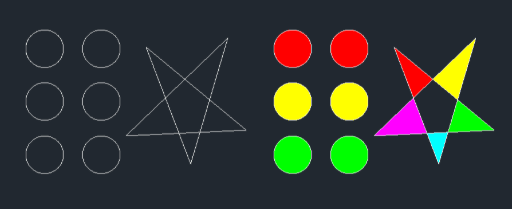
This tool allows you to quickly apply a Solid Hatch by either picking an internal point or selecting an object.
- Efficiency
- It bypasses the standard hatch settings menu to immediately fill areas with a solid color.
- Color Control
- You can specify the color number for the hatch directly within the command. The hatch will be created on the current layer but forced to the specified color.
- Compatibility
- This is a dedicated Cadopilar Lisp tool and works only within Cadopilar.
How to use
Perform Hatching:
The command repeats infinitely; press Esc to exit when finished.
- 1.Type solh in the command line and press Enter.
- 2.Choose the Selection Method:
- 3.Press Enter (or type K) for Point Selection Mode.
- 4.Type B and press Enter for Object Selection Mode.
- 5.Enter the Color Number (Index Color) you want to use for the solid hatch.
- If Point Mode
- Click inside the closed area you want to fill.
- If Object Mode
- Select the closed object(s) and press Enter.
Example
Included free
All 401 LISP utilities come free with every Cadopilar license.
Purchase any Cadopilar license and our team will install the complete suite for you. No additional charge, no setup headaches.
Contact us to get started →