Description
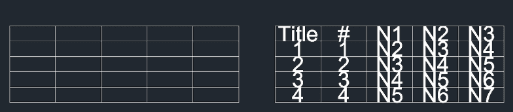
This tool automatically fills the cells of a drawn table with text and immediately enters an editing mode for quick data entry.
- Efficiency
- It eliminates the need to manually place and align text in each cell. It populates all cells with placeholder text ("JHK") and then sequentially prompts you to edit each one.
- Limitation
- Currently, this tool works best with tables where the cells are of uniform size.
- Compatibility
- This is a dedicated Cadopilar Lisp tool and works only within Cadopilar.
How to use
All cells will be filled with placeholder text, and the tool will automatically start the Edit Mode.
- 1.Type tnm in the command line and press Enter.
- 2.Click the Bottom-Left Corner of the table.
- 3.Click the Top-Right Corner of the table.
- 4.Enter the Text Height (either by typing a value or clicking two points on the screen).
- 5.Type your desired text for the first cell and press Enter to jump to the next cell. Repeat until finished.
Example
Included free
All 401 LISP utilities come free with every Cadopilar license.
Purchase any Cadopilar license and our team will install the complete suite for you. No additional charge, no setup headaches.
Contact us to get started →