Description
This tool automatically generates the Centerline for a Slot Hole (an elongated hole with rounded ends).
- Auto-Centerline
- Draws the necessary centerlines for a slot by analyzing its two end arcs.
- Auto-Explode
- If the slot is drawn as a Polyline (PLINE), the tool will first explode it into individual arcs and lines. You will then need to run the command again to select the arcs.
How to use
- 1.Type SLOTC in the command line and press Enter.
- 2.Select the First Arc (end curve) of the slot.
- 3.Select the Second Arc (opposite end curve) of the slot.
- Tip
- You can easily draw a slot first using Utility > Draw > Slot in the Cadopilar menu.
Note
- If the slot was a Polyline, it will explode first. Simply re-run SLOTC and select the arcs again.
Example
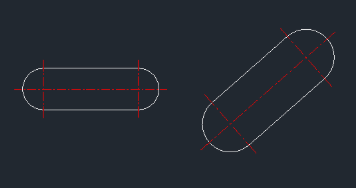
Included free
All 401 LISP utilities come free with every Cadopilar license.
Purchase any Cadopilar license and our team will install the complete suite for you. No additional charge, no setup headaches.
Contact us to get started →