LISP Utilities
CIN2Tcin2t.elfDraw Split Circle Tag
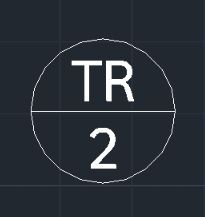
Generates a bisected circle containing two lines of text.
Description
This tool automatically draws a Circle and places Two Lines of Text inside it, perfectly aligned.
- Labeling Made Easy
- Ideal for creating balloons, tags, or identifiers that require two pieces of information (e.g., Part Number and Quantity) within a single circle.
- Automated Formatting
- Draws the circle and positions both lines of text instantly based on your input.
How to use
The circle with the two lines of text is created immediately.
- 1.Type CIN2T in the command line and press Enter.
- 2.Click the Center Point where you want the circle.
- 3.Enter the Diameter of the circle.
- 4.Enter the content for the First Line (Top) of text.
- 5.Enter the content for the Second Line (Bottom) of text.
Example
Included free
All 401 LISP utilities come free with every Cadopilar license.
Purchase any Cadopilar license and our team will install the complete suite for you. No additional charge, no setup headaches.
Contact us to get started →