LISP Utilities
NRnr.elfDraw Rectangle with Fillet/Chamfer
Enhanced rectangle command allowing chamfering or filleting
Description
This tool is an improved version of the standard RECTANG command, designed to simplify drawing rectangles with Fillets (Rounding) or Chamfers.
- Direct Input
- Instead of navigating through options (like "Fillet" or "Chamfer" sub-menus), you can define dimensions and corner modifications in a single sequence.
How to use
The rectangle is drawn with the specified dimensions and corners immediately.
- 1.Type NR in the command line and press Enter.
- 2.Click the Bottom-Left Corner (Start Point).
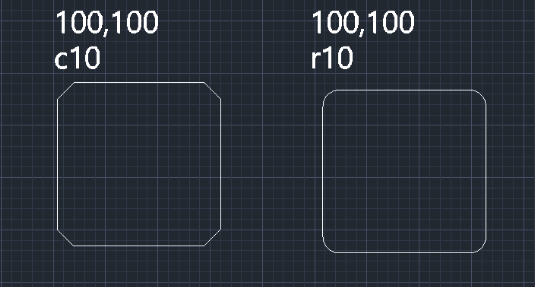
- 3.Enter the dimensions in the format Width,Height (e.g., 100,50) and press Enter.
- 4.Enter the Corner Option:
- For Rounding
- Type R followed by the radius (e.g., R10).
- For Chamfer
- Type C followed by the distance (e.g., C10).
- For Square Corners
- Type R0 or C0.
Example
Included free
All 401 LISP utilities come free with every Cadopilar license.
Purchase any Cadopilar license and our team will install the complete suite for you. No additional charge, no setup headaches.
Contact us to get started →