Description
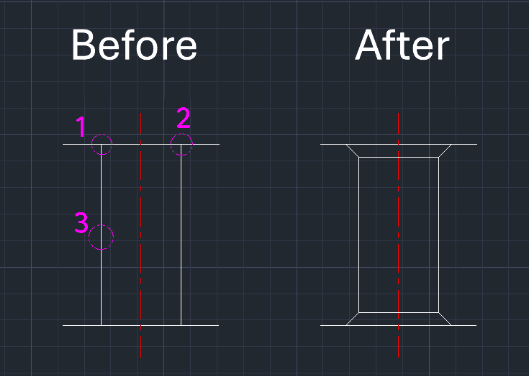
This tool is designed to easily apply a Chamfer to the top openings of a vertical through-hole (or similar internal geometry).
- Efficiency
- Standard CHAMFER commands often trim the connecting horizontal lines, requiring you to re-extend (EXTEND), re-trim, or mirror the geometry. This tool handles the entire process automatically without breaking the surrounding lines.
- Dual Action
- It processes both the top and bottom chamfers (or left and right sides of the hole) in one go.
How to use
- 1.Type GOOD in the command line and press Enter.
- 2.Enter the Chamfer Distance (applies equally to both sides).
- 3.Select the Left Point (intersection corner) of the hole opening.
- 4.Select the Right Point (intersection corner) of the hole opening.
Note
- The order (Left then Right) is important.
Example
Included free
All 401 LISP utilities come free with every Cadopilar license.
Purchase any Cadopilar license and our team will install the complete suite for you. No additional charge, no setup headaches.
Contact us to get started →