Description
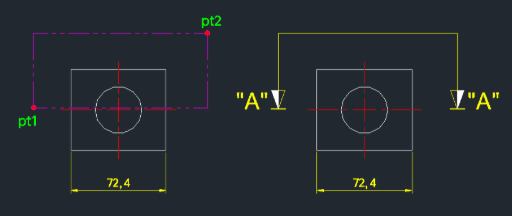
This tool automatically draws a standard "SECTION A-A" section mark, including the arrow and text label.
- Dynamic Direction
- The direction and filling of the arrow symbol automatically adjust based on the relative positions of the two points you click (the endpoint and the upper-right point).
How to use
The section mark "SECTION A-A" with the appropriate arrow is drawn.
- 1.Type sectaa in the command line and press Enter.
- 2.Click the Arrow End Point (PT1).
- 3.Click the Upper Right Point (PT2) where the text label should generally align.
Example
Included free
All 401 LISP utilities come free with every Cadopilar license.
Purchase any Cadopilar license and our team will install the complete suite for you. No additional charge, no setup headaches.
Contact us to get started →