LISP Utilities
CLLCLL.elfDraw Centerline (Max Circle)
Generates centerlines based on the largest circle.
Description
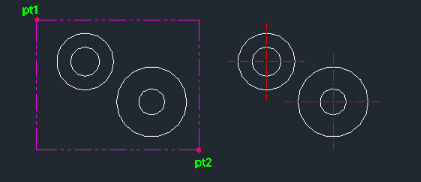
This tool automatically generates center lines for large circles based on the selected circle objects.
- Batch Processing
- Allows you to select multiple circles at once (e.g., via a window selection PT1 to PT2).
- Automatic Generation
- Once selected, the tool immediately draws the appropriate center lines for all the identified large circles.
How to use
Center lines are automatically drawn for the selected large circles.
- 1.Type cll in the command line and press Enter.
- 2.Click the First Corner Point (PT1) of your selection window.
- 3.Click the Opposite Corner Point (PT2) to complete the selection.
Example
Included free
All 401 LISP utilities come free with every Cadopilar license.
Purchase any Cadopilar license and our team will install the complete suite for you. No additional charge, no setup headaches.
Contact us to get started →