LISP Utilities
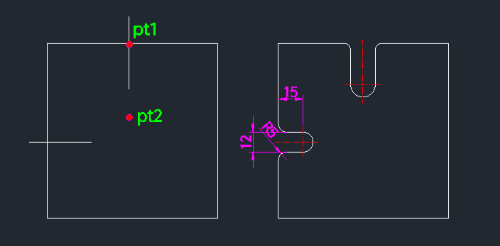
2RBH2RBH.elfCut Open Bolt Hole
Generates an open bolt hole with filleted entry corners.
Description
This tool creates the profile for a bolt hole that is rounded on both the entrance and exit sides (e.g., a counterbored hole with fillets).
- Detailed Geometry
- It allows you to specify not just the width and depth of the hole, but also the fillet radius for the opening, creating a more realistic or specific mechanical detail.
- Input
- Requires a center point, direction, hole diameter (width), hole depth, and the fillet radius for the entrance.
How to use
The complete bolt hole profile with rounded edges is drawn.
- 1.Type 2rbh in the command line and press Enter.
- 2.Click the Center Point (PT1).
- 3.Click the Direction Point (PT2).
- 4.Enter the Hole Width (Diameter).
- 5.Enter the Hole Depth.
- 6.Enter the Fillet Radius for the hole entrance.
Example
Included free
All 401 LISP utilities come free with every Cadopilar license.
Purchase any Cadopilar license and our team will install the complete suite for you. No additional charge, no setup headaches.
Contact us to get started →