Description
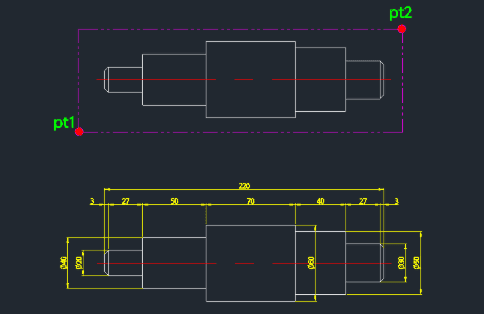
This tool completely automates the dimensioning of shafts, including the insertion of diameter symbols (Ø).
- Two-Step Dimensioning
- First places the vertical dimension for the diameter, then the horizontal dimension for the length.
- Auto-Symbol
- Automatically adds the diameter symbol (Ø) to the vertical dimension text.
- Precision Control
- Allows user to set decimal precision for the diameter dimension.
- Smart Spacing
- Dimension line spacing is automatically adjusted based on DIMTXT (text size) and DIMSCALE variables.
- Input
- Requires selecting two points to define the feature, and then specifying the decimal precision.
How to use
The tool automatically adds the Ø symbol to the vertical dimension and creates the corresponding horizontal dimension at the top.
- 1.Type sda in the command line and press Enter.
- 2.Click the First Point (PT1) of the shaft feature.
- 3.Click the Second Point (PT2).
- 4.Press Enter to place the vertical dimension.
- 5.Enter the number of Decimal Places (integer) for the vertical dimension and press Enter.
Example
Included free
All 401 LISP utilities come free with every Cadopilar license.
Purchase any Cadopilar license and our team will install the complete suite for you. No additional charge, no setup headaches.
Contact us to get started →