LISP Utilities
CDMCDM.ELFAdjust Circle Distance (Horizontal/Vertical)
Adjusts the spacing between two circles by a specified value.
Description
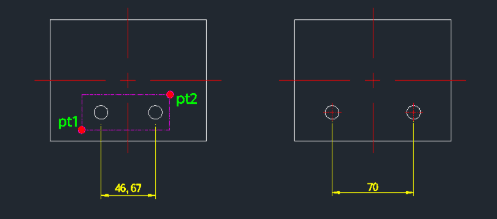
This tool adjusts the distance between two selected circles to a user-specified value, moving them horizontally or vertically as needed.
- Precise Spacing
- Easily sets the exact distance (center-to-center) between two circles.
- Symmetrical Movement
- Moves both circles equally from their collective center point to achieve the target distance.
- Automatic Centerlines
- Automatically draws centerlines for the moved circles.
- Auto-Orientation
- Detects whether the circles are aligned horizontally or vertically and adjusts the movement direction accordingly.
- Input
- Requires selecting two circles and entering the desired distance.
How to use
The current distance is displayed in the command line.
The circles move apart (or closer) to match the new distance, and centerlines are drawn.
- 1.Type cdm in the command line and press Enter.
- 2.Click the First Circle (PT1).
- 3.Click the Second Circle (PT2).
- 4.Enter the New Distance value (e.g., 70) and press Enter.
Example
Included free
All 401 LISP utilities come free with every Cadopilar license.
Purchase any Cadopilar license and our team will install the complete suite for you. No additional charge, no setup headaches.
Contact us to get started →