Description
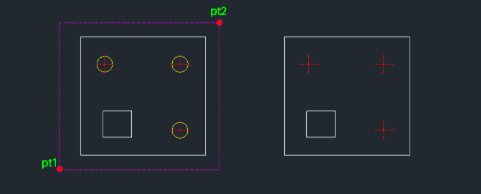
This tool allows you to quickly delete circles within a selected area based on their diameter.
- Filter by Size
- You can specify a diameter, and only circles matching that size within the selection window will be deleted.
- Delete All
- If no diameter is specified (by pressing Enter), all circles within the selected area will be deleted.
- Selection Method
- Uses a standard window selection to define the area.
- Input
- Requires defining a selection window and optionally entering a diameter value.
How to use
Alternatively, press Enter without typing a value to delete all circles in the selection.
The matching circles (or all circles) within the area are deleted.
- 1.Type delc in the command line and press Enter.
- 2.Click the First Corner (PT1) of the selection area.
- 3.Click the Diagonal Corner (PT2) to complete the selection window.
- 4.Enter the Diameter of the circles you want to delete and press Enter.
Example
Included free
All 401 LISP utilities come free with every Cadopilar license.
Purchase any Cadopilar license and our team will install the complete suite for you. No additional charge, no setup headaches.
Contact us to get started →