Description
This tool simplifies the SCALE command's "Reference" (R) option, making it easier to resize objects based on reference points.
- Direct Reference
- Eliminates the need to manually type 'R' or calculate scale factors.
- Point-to-Point Scaling
- You pick two points on the original object (current length) and two points for the target length (new length). The object scales automatically based on these two distances.
How to use
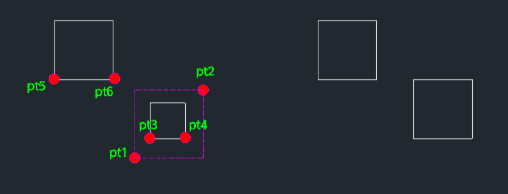
The selected objects are scaled relative to the first base point (PT3).
- 1.Type sc2 in the command line and press Enter.
- 2.Select the Objects to scale (using a window or clicking) and press Enter.
- 3.Click the Base Point (PT3) and Reference Point (PT4) on the object to define its current size.
- 4.Click the Target Base Point (PT5) and Target End Point (PT6) to define the new desired size.
Example
Included free
All 401 LISP utilities come free with every Cadopilar license.
Purchase any Cadopilar license and our team will install the complete suite for you. No additional charge, no setup headaches.
Contact us to get started →