LISP Utilities
RRA2RRA2.elfDraw Round Rect Array (2-Col)
Generates a two-column rounded rectangle array.
Description
This tool creates a rounded rectangle and then arrays it in two vertical columns (or rows, depending on interpretation, but typically a 2-column layout).
- Grid Array
- Unlike RRA which creates a single linear array, RRA2 creates a dual-line array, useful for layouts requiring paired or double-row placement.
- Input
- Requires a start point, dimensions (width/height), corner radius, pitch distances for both Y (vertical spacing) and X (horizontal spacing between columns/rows) directions, and the total vertical count per column.
How to use
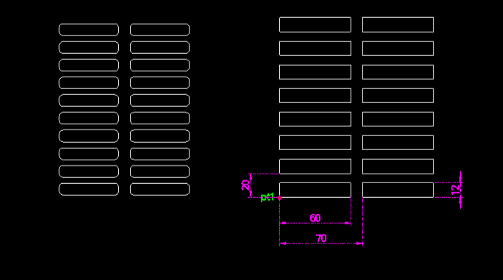
The 2-column array of rounded rectangles is generated.
- 1.Type rra2 in the command line and press Enter.
- 2.Click the Start Point (PT1).
- 3.Enter the Width of the rectangle.
- 4.Enter the Height of the rectangle.
- 5.Enter the Corner Radius (0 for sharp corners).
- 6.Enter the Vertical Pitch (Y-axis distance to next rectangle).
- 7.Enter the Horizontal Pitch (X-axis distance to the next column).
- 8.Enter the Total Vertical Count (number of rectangles per column).
Example
Included free
All 401 LISP utilities come free with every Cadopilar license.
Purchase any Cadopilar license and our team will install the complete suite for you. No additional charge, no setup headaches.
Contact us to get started →