Description
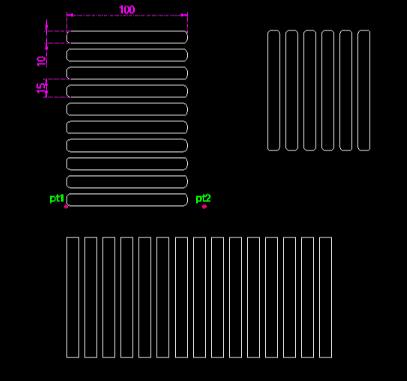
This tool draws a rounded rectangle and then creates a linear array of it in a specified direction.
- Batch Creation
- Efficiently generates multiple identical rounded rectangles spaced evenly.
- Rounded Corners
- Allows specifying a radius for the corners (input 0 for sharp corners).
- Input
- Requires a start point, direction, width, height, corner radius, pitch (distance between rectangles), and the total count.
How to use
The specified number of rounded rectangles are drawn in a line.
- 1.Type rra in the command line and press Enter.
- 2.Click the Start Point (PT1).
- 3.Click the Direction Point (PT2).
- 4.Enter the Width of the rectangle.
- 5.Enter the Height of the rectangle.
- 6.Enter the Corner Radius (Enter 0 for a standard rectangle).
- 7.Enter the Pitch Distance (distance from start of one to start of the next).
- 8.Enter the Total Count of rectangles to array.
Example
Included free
All 401 LISP utilities come free with every Cadopilar license.
Purchase any Cadopilar license and our team will install the complete suite for you. No additional charge, no setup headaches.
Contact us to get started →