Description
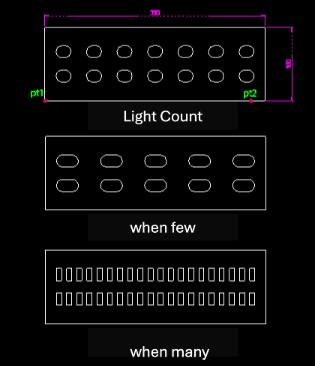
This tool automatically draws an array of LED lights within a specified rectangular area, typically for electrical or lighting plans.
- Smart Layout
- It arranges the lights (defaulting to two rows) based on the specified area dimensions and count.
- Auto-Spacing
- The left and right margins are automatically calculated to space the lights evenly.
- Shape Variation
- As the number of lights increases, the representation might change (e.g., to a square or semicircle, based on the description, though primarily it arrays the light symbol).
- Input
- Requires a start point, direction, width, height, and the total count of lights in the horizontal direction.
How to use
The LsED lights are drawn and arranged within the defined area.
- 1.Type led in the command line and press Enter.
- 2.Click the Start Point (PT1).
- 3.Click the Direction Point (PT2).
- 4.Enter the Horizontal Distance (Width of the area).
- 5.Enter the Vertical Distance (Height of the area).
- 6.Enter the Horizontal Light Count.
Example
Included free
All 401 LISP utilities come free with every Cadopilar license.
Purchase any Cadopilar license and our team will install the complete suite for you. No additional charge, no setup headaches.
Contact us to get started →