Description
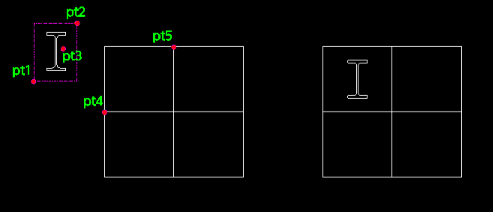
This tool centers selected objects within a specific cell or rectangular area (defined by grid lines).
- Alignment
- Useful for tidying up tables or grids where contents need to be perfectly centered.
- Process
- It temporarily creates a block of the selected objects to calculate their collective center, moves them, and then explodes them back to their original state.
- Input
- Requires selecting the objects to move, an arbitrary point on the objects, and two diagonal points defining the cell boundary.
How to use
The selected objects are moved to the center of the defined cell area.
- 1.Type etoc in the command line and press Enter.
- 2.Select the objects to move using a window (click PT1 then PT2).
- 3.Click an Arbitrary Point on or near the selected objects (PT3).
- 4.Click the First Corner of the target cell (PT4).
- 5.Click the Second Corner of the target cell (PT5 - diagonal to PT4).
Example
Included free
All 401 LISP utilities come free with every Cadopilar license.
Purchase any Cadopilar license and our team will install the complete suite for you. No additional charge, no setup headaches.
Contact us to get started →