LISP Utilities
ROALroal.elfAlign Object (Move/Rotate)
Enhanced ALIGN command that rotates and positions objects
Description
This tool is designed to simultaneously Move, Rotate, and Align an object (such as a detail drawing or plan) to match an inclined or specific orientation on your drawing.
- Auto-Orientation
- Unlike standard MOVE and ROTATE sequences, this tool handles placement and rotation in one go.
- Smart Spacing
- Unlike the standard ALIGN command which snaps objects directly onto the target line, ROAL maintains a proportional offset distance, making it perfect for placing detail views near the corresponding section without overlapping.
How to use
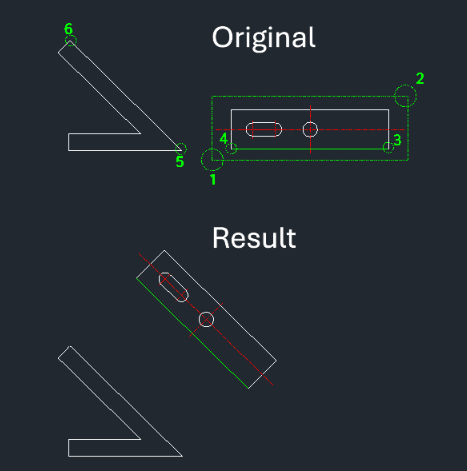
The object is moved, rotated to match the target angle, and placed at a calculated offset distance.
- 1.Type ROAL in the command line and press Enter.
- 2.Select the Objects you want to move/align using a window selection (e.g., points 1 and 2 in the example).
- 3.Select the Base Points on the object (points 3 and 4).
- 4.Select the Target Points on the destination geometry (points 5 and 6).
- Important
- The selection order of points is crucial for correct orientation.
Example
Included free
All 401 LISP utilities come free with every Cadopilar license.
Purchase any Cadopilar license and our team will install the complete suite for you. No additional charge, no setup headaches.
Contact us to get started →