LISP Utilities
LLLL.elfCap 2 Lines with Segment
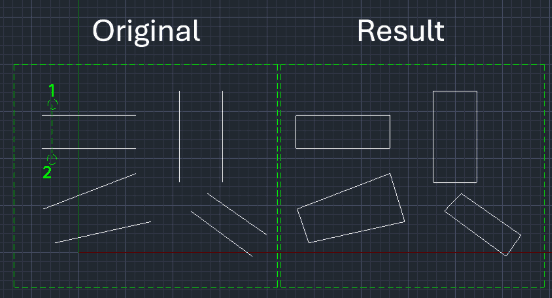
Generates a closing line segment between the endpoints of two selected lines
Description
This tool is designed to quickly close the gap between two lines by drawing a connecting line at their endpoints.
- Smart Connection
- Instead of carefully snapping to endpoints using Object Snaps (Osnap), you can simply select the two lines "roughly" (crossing them), and the tool automatically connects their nearest ends.
- Layer Matching
- The new connecting line inherits the layer properties of the existing objects.
How to use
The tool automatically draws a line connecting the endpoints of the selected lines.
- 1.Type LL in the command line and press Enter.
- 2.Click two points to create a selection line that crosses the ends of the two lines you want to connect (roughly select the area where the connection should happen).
Example
Included free
All 401 LISP utilities come free with every Cadopilar license.
Purchase any Cadopilar license and our team will install the complete suite for you. No additional charge, no setup headaches.
Contact us to get started →