LISP Utilities
DMIdmi.elfDouble Mirror
Performs two consecutive mirror operations on selected objects.
Description
This tool simplifies the process of mirroring an object twice in succession (creating multiple symmetrical copies).
- Efficiency
- Instead of running the MIRROR command multiple times manually, this tool executes a "Double Mirror" operation in a simplified sequence.
How to use
The object is mirrored across the first line, and then the results are mirrored across the second line automatically (completing the operation with just 4 clicks).
- 1.Type DMI in the command line and press Enter.
- 2.Select the Objects to mirror using a window selection (click two points to enclose the object).
- 3.Select the First Mirror Line (Line 1).
- 4.Select the Second Mirror Line (Line 2).
Example
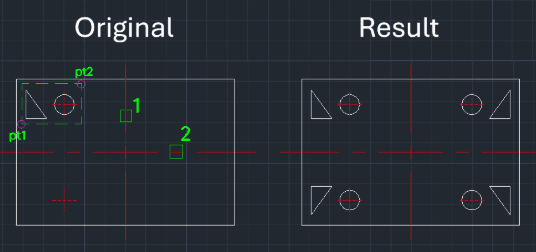
Included free
All 401 LISP utilities come free with every Cadopilar license.
Purchase any Cadopilar license and our team will install the complete suite for you. No additional charge, no setup headaches.
Contact us to get started →