Description
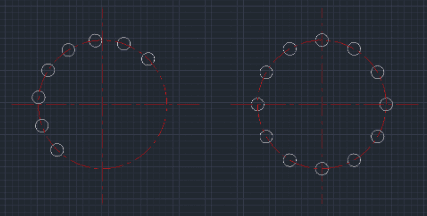
This tool combines drawing a Circle and performing a Polar Array (Circular Array) into a single command.
- Streamlined Workflow
- Instead of drawing a circle, moving it to the correct distance, and then running the Array command, this tool handles everything in one sequence.
- Assumption
- It assumes the center point of the array (the main axis) is already defined or known.
How to use
The circle is drawn and arrayed automatically based on your inputs.
- 1.Type CAR in the command line and press Enter.
- 2.Click the Center Point for the array (the central axis of rotation).
- 3.Enter the Distance from the array center to the circle center (Radius of the array).
- 4.Enter the Radius of the circle itself.
- 5.Enter the Total Number of circles (items).
- 6.Enter the Fill Angle (Total angle to fill, e.g., 360).
- 7.Enter the Start Angle (the angle where the first circle should be drawn).
Example
Included free
All 401 LISP utilities come free with every Cadopilar license.
Purchase any Cadopilar license and our team will install the complete suite for you. No additional charge, no setup headaches.
Contact us to get started →