LISP Utilities
MXmymx.elfMove Horizontal (X-Only) / Vertical (Y-Only)
Moves objects to align with a vertical (mx) or horizontal (my) centerline.
Description
This tool allows you to easily Align Objects horizontally or vertically based on reference lines (centerlines).
Two Modes :
- Alignment made easy
- Perfect for aligning a plan view with a front view, or centering objects relative to each other.
- MX
- Moves objects horizontally (along the X-axis) to align centers.
- MY
- Moves objects vertically (along the Y-axis) to align centers.
How to use
The object moves to align its centerline with the target centerline.
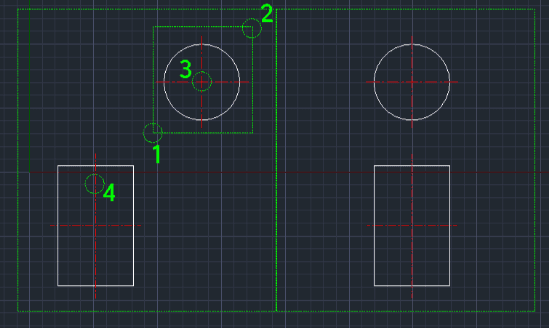
- 1.Type MX (for horizontal move) or MY (for vertical move) in the command line and press Enter.
- 2.Select the Objects to move using a window selection.
- 3.Select the Source Centerline (the reference line on the object you are moving).
- 4.Select the Target Centerline (the destination reference line).
Example
Included free
All 401 LISP utilities come free with every Cadopilar license.
Purchase any Cadopilar license and our team will install the complete suite for you. No additional charge, no setup headaches.
Contact us to get started →