Description
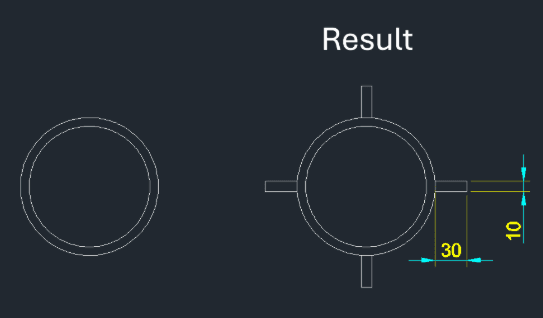
This tool is designed for mechanical and plant design to automatically draw 4 Ribs around a circular pipe in the plan view.
- Auto-Rib Generation
- Creates four ribs (stiffeners) equally spaced (90 degrees apart) around a selected circle.
- Custom Dimensions
- You can control the thickness of the rib material and the radial width/distance of the rib.
How to use
Four ribs are automatically drawn around the circle.
- 1.Type RIB in the command line and press Enter.
- 2.Select the Circle (pipe) around which you want to draw the ribs.
- 3.Enter the Rib Thickness (Material Thickness).
- 4.Enter the Rib Distance (Width/Length of the rib extending from the pipe).
Example
Included free
All 401 LISP utilities come free with every Cadopilar license.
Purchase any Cadopilar license and our team will install the complete suite for you. No additional charge, no setup headaches.
Contact us to get started →