LISP Utilities
ACOLacol.elfAuto Column Grid
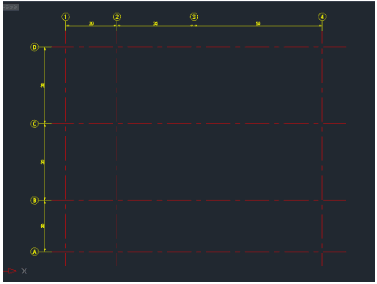
Interactively generates column centerlines and numbering for architectural drawings.
Description
This tool is an interactive utility for drawing Column Centerlines (Grids) and Column Numbers (Bubbles), which is typically the first step in architectural drafting.
- Interactive Mode
- Guides you through inputs for building size, intervals, and numbering.
- Auto-Dimensioning
- Automatically places dimensions along with the grid lines and bubbles.
- Flexible Numbering
- Supports numeric (0, 1, 2...) for horizontal grids and alphabetic (A, B, C...) for vertical grids.
How to use
Horizontal Grid Setup:
Vertical Grid Setup:
The grid, bubbles, and dimensions are drawn instantly.
- 1.Type ACOL in the command line and press Enter.
- 2.Enter the Total Width and Total Height of the building.
- 3.Click the Bottom-Left Corner (Start Point).
- 4.Enter the Diameter for the column number circles (bubbles).
- 5.Enter the Start Number (e.g., 0 or 1).
- 6.Enter the distance to the Next Column repeatedly.
- 7.Type 0 and press Enter to finish horizontal lines.
- 8.Enter the Start Character (e.g., A).
- 9.Enter the distance to the Next Column repeatedly.
- 10.Type 0 and press Enter to finish vertical lines.
Example
Included free
All 401 LISP utilities come free with every Cadopilar license.
Purchase any Cadopilar license and our team will install the complete suite for you. No additional charge, no setup headaches.
Contact us to get started →