LISP Utilities
DTODdtod.elfOverride Dim with Measure
Overwrites a dimension's text value with the measured distance between two selected points.
Description
This tool allows you to measure the distance between two points on your drawing and instantly apply that measured value to an existing dimension object.
- Value Override
- Useful when you need a dimension text to reflect a specific physical distance measured elsewhere, or to force a value based on a measurement.
- Format
- The number format (decimal places) respects your current units settings (adjustable via the UNITS command).
How to use
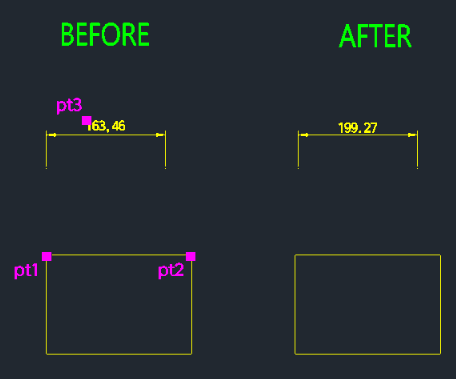
The distance between these two points is calculated.
The dimension text changes to match the measured distance.
- 1.Type DTOD in the command line and press Enter.
- 2.Click the First Point to measure from.
- 3.Click the Second Point to measure to.
- 4.Select the Dimension Object you want to update.
Note
- If you select a non-dimension object, the tool will prompt you again until a valid dimension is selected.
Example
Included free
All 401 LISP utilities come free with every Cadopilar license.
Purchase any Cadopilar license and our team will install the complete suite for you. No additional charge, no setup headaches.
Contact us to get started →