LISP Utilities
SAMGAKsamgak.elfDraw Finish Symbol
Generates surface finish symbols for mechanical drawings.
Description
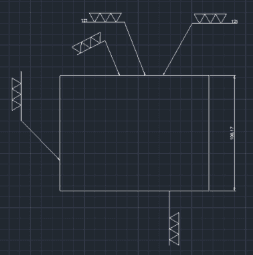
This tool is designed for mechanical drafting to easily insert Surface Finish Symbols (Triangle marks) onto your drawings.
- Directional Drawing
- Can draw the triangles in any direction based on the points you select.
- Customizable
- You can specify the size (side length) and the number of triangles (e.g., 1, 2, or 3 marks) to indicate roughness.
How to use
The surface finish symbol is drawn automatically.
- 1.Type SAMGAK in the command line and press Enter.
- 2.Click the Start Point (tip of the triangle touching the surface).
- 3.Click a point in the Direction the triangles should point/stack (e.g., upwards away from the surface).
- 4.Enter the Length of one side of the triangle.
- 5.Enter the Quantity of triangles (e.g., 3 for a very fine finish).
Example
Included free
All 401 LISP utilities come free with every Cadopilar license.
Purchase any Cadopilar license and our team will install the complete suite for you. No additional charge, no setup headaches.
Contact us to get started →