LISP Utilities
REVMrevm.elfDraw Revision Mark
Generates revision marks linked to DIMSCALE and DIMTXT settings.
Description
This tool allows you to easily place a Revision Mark (Delta symbol with a number/letter) on your drawing.
- Standard Symbol
- Draws a triangle with the revision character centered inside.
- Auto-Scaling
- The text size automatically adjusts to match your current dimension text settings.
How to use
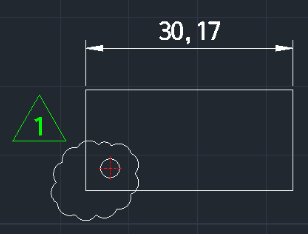
The triangle mark with the centered text is drawn immediately.
- 1.Type REVM in the command line and press Enter.
- 2.Click the Insertion Point where you want the revision mark to appear.
- 3.Enter the Revision Character (e.g., 1, A, etc.) and press Enter.
Example
Included free
All 401 LISP utilities come free with every Cadopilar license.
Purchase any Cadopilar license and our team will install the complete suite for you. No additional charge, no setup headaches.
Contact us to get started →