LISP Utilities
ACLacl.elfAuto Centerline & Circles
Generates centerlines and circles on separate layers.
Description
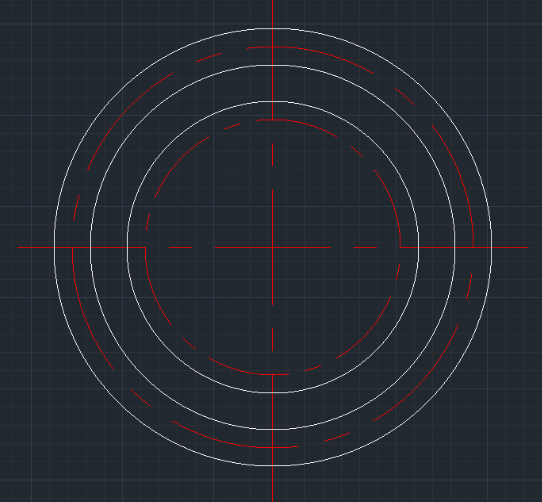
This tool allows you to automatically draw a base set of cross-hair centerlines and then rapidly add multiple concentric circles (either visible outlines or circular centerlines) around a single center point.
- Auto-Sizing
- The initial centerlines are automatically drawn slightly larger than the largest diameter you specify.
- Layer Control via Prefix
- You can easily switch between drawing a normal circle (Layer 0) and a circular centerline (Layer Center) by adding a prefix to your input.
How to use
Add Concentric Circles:
- 1.Type ACL in the command line and press Enter.
- 2.Click the Center Point for the circles.
- 3.Enter the Diameter for the main cross-hair centerlines (typically the size of your largest intended circle).
- 4.Press ESC to finish.
- Example
- Type 100 and press Enter. The cross-hairs are drawn to fit a 100mm circle.
- For a Normal Circle (Layer 0)
- Type the diameter starting with 0.
- Example
- 050 -> Draws a 50mm circle on Layer 0.
- Example
- 085 -> Draws an 85mm circle on Layer 0.
- For a Centerline Circle (Layer Center)
- Type C followed by the diameter.
- Example
- C70 -> Draws a 70mm circle on the CENTER layer.
- Example
- C100 -> Draws a 100mm circle on the CENTER layer.
Example
Included free
All 401 LISP utilities come free with every Cadopilar license.
Purchase any Cadopilar license and our team will install the complete suite for you. No additional charge, no setup headaches.
Contact us to get started →