Description
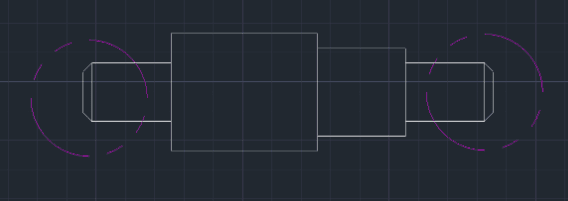
This tool automatically applies a Chamfer to the end of a shaft (or rectangular profile) by simply selecting the three boundary lines.
- Shaft Optimization
- Specifically designed to quickly chamfer the end of a shaft in a 2D view.
- Sequential Selection
- You define the geometry by clicking the top, vertical end, and bottom lines in order, and the tool handles the trimming and chamfering.
How to use
The tool automatically applies the chamfer to both corners of the shaft end.
- 1.Type ASC in the command line and press Enter.
- 2.Enter the Chamfer Distance (Value).
- 3.Select the Top Line of the shaft.
- 4.Select the Vertical Line (the end face of the shaft).
- 5.Select the Bottom Line of the shaft.
Example
Included free
All 401 LISP utilities come free with every Cadopilar license.
Purchase any Cadopilar license and our team will install the complete suite for you. No additional charge, no setup headaches.
Contact us to get started →