LISP Utilities
CSIDEcside.elfProject Circular Side View
Generates circular side profile view from a front view.
Description
This tool automatically generates the Right Side View of a cylindrical or circular object based on its Front View geometry.
- View Generation
- Instantly draws the side view (circles/rectangles) and centerlines corresponding to the horizontal lines you select from the front view.
- Auto-Centerline
- Automatically places the centerline for the new view.
How to use
The tool automatically draws the corresponding Side View and Centerlines.
- 1.Type CSIDE in the command line and press Enter.
- 2.Select the Center Line of the existing Front View.
- 3.Click a point to the Right where you want the Side View to be drawn.
- 4.Select the Top-Most Horizontal Line of the object first.
- 5.Select any remaining Horizontal Lines that define the object's features.
- Important
- You must pick the highest line first to ensure the centerline is drawn correctly.
Example
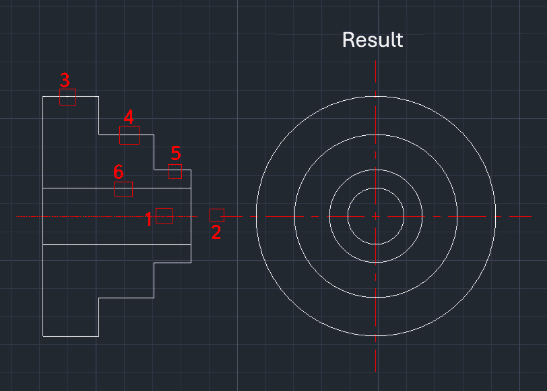
Included free
All 401 LISP utilities come free with every Cadopilar license.
Purchase any Cadopilar license and our team will install the complete suite for you. No additional charge, no setup headaches.
Contact us to get started →