LISP Utilities
AWIPEawipe.elfMask Text (Wipeout)
Enhanced wipeout to mask the text background for better visibility.
Description
This tool improves the standard WIPEOUT command specifically for text, allowing you to automatically mask the background behind text to make it stand out.
- Text Emphasis
- Creates a background mask (wipeout frame) around selected text so it remains readable even when placed over other objects.
- Simplified Process
- Automatically detects the text boundary and lets you confirm the mask placement with a click.
How to use
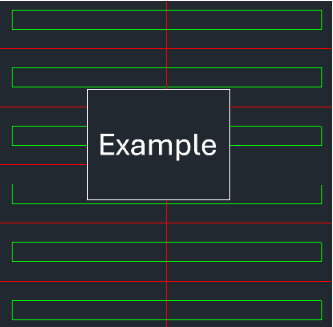
A rectangle will automatically appear around the text boundary.
The text background is now masked.
- 1.Type AWIPE in the command line and press Enter.
- 2.Select the Text Object you want to emphasize.
- 3.Click the Bottom-Left Corner of this rectangle to confirm and apply the wipeout.
- Prerequisite
- Ensure the text you want to mask is already written on the screen.
Example
Included free
All 401 LISP utilities come free with every Cadopilar license.
Purchase any Cadopilar license and our team will install the complete suite for you. No additional charge, no setup headaches.
Contact us to get started →