Description
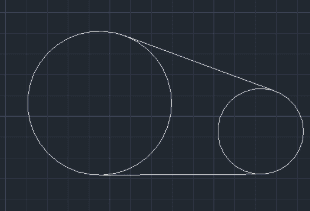
This tool allows you to easily draw Tangent Lines between two circles.
- Tangent Connections
- Creates lines that perfectly touch (tangent) two selected circles.
- Flexible Tangency
- Can draw external tangents (connecting outer sides) or internal tangents (crossing), depending on which side of the circles you click.
How to use
(Repeat selection to draw more tangent lines as needed, e.g., for the other side).
The tool draws the tangent line connecting the selected points on the circles.
- 1.Type CTAN in the command line and press Enter.
- 2.Click the first Circle near the point where the tangent should start.
- 3.Click the second Circle near the point where the tangent should end.
Example
Included free
All 401 LISP utilities come free with every Cadopilar license.
Purchase any Cadopilar license and our team will install the complete suite for you. No additional charge, no setup headaches.
Contact us to get started →