LISP Utilities
CL3cl3.elfDraw Angled Centerline
Generates angled centerlines for existing circles with adjustable extensions.
Description
This tool allows you to draw Inclined (Angled) Centerlines for a circle, rather than just vertical/horizontal ones.
- Flexible Angle
- You can define any angle for the centerlines, which is useful for holes located on rotated parts or angled sections.
- Interactive Control
- The length of the centerline extension and its angle are determined simultaneously by clicking a single point.
How to use
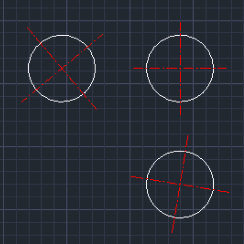
The tool draws the cross-hair centerlines rotated to align with the point you clicked.
- 1.Type CL3 in the command line and press Enter.
- 2.Select the Circle you want to add a centerline to.
- 3.Click a point outside the circle to define both the Extension Length and the Angle of the centerline.
Example
Included free
All 401 LISP utilities come free with every Cadopilar license.
Purchase any Cadopilar license and our team will install the complete suite for you. No additional charge, no setup headaches.
Contact us to get started →