Description
This tool streamlines the process of creating a closed rectangular boundary from selected lines, joining them, and then offsetting the result.
- Join & Offset
- Instead of manually joining lines into a polyline and then using the offset command, this tool does it in one sequence.
- Ideal for Rectangles
- Particularly useful for creating offset boundaries around rectangular shapes defined by individual lines.
- Input
- Requires two points to define the rectangle (or area), the offset distance, selecting the objects, and the offset direction.
How to use
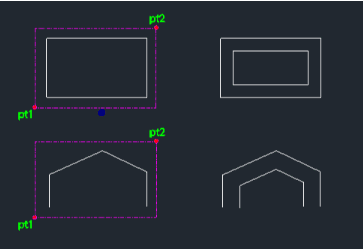
The lines are joined into a closed shape and offset by the specified distance.
- 1.Type reco in the command line and press Enter.
- 2.Click the First Point (PT1).
- 3.Click the Second Point (PT2) to define the area.
- 4.Enter the Offset Distance.
- 5.Select the Objects (lines) to be joined and offset.
- 6.Click the Direction for the offset.
Example
Included free
All 401 LISP utilities come free with every Cadopilar license.
Purchase any Cadopilar license and our team will install the complete suite for you. No additional charge, no setup headaches.
Contact us to get started →