LISP Utilities
AWIPEAwipe.elfMask Text (Wipeout)
Enhanced wipeout to mask the text background for better visibility.
Description
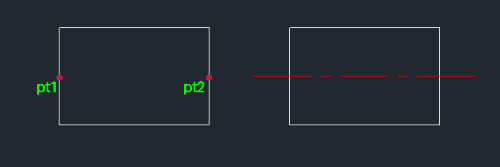
This tool draws a center line between two selected points and automatically places it on the CENTER layer.
- Auto-Layer
- Automatically creates the CENTER layer if it doesn't exist.
- LTSCALE Adjustment
- Automatically adjusts the line type scale (LTSCALE).
- Input
- Requires two points to define the line segment.
How to use
A center line is drawn between the two points on the CENTER layer.
- 1.Type cl4 in the command line and press Enter.
- 2.Click the First Point (PT1).
- 3.Click the Second Point (PT2).
Example
Included free
All 401 LISP utilities come free with every Cadopilar license.
Purchase any Cadopilar license and our team will install the complete suite for you. No additional charge, no setup headaches.
Contact us to get started →