Description
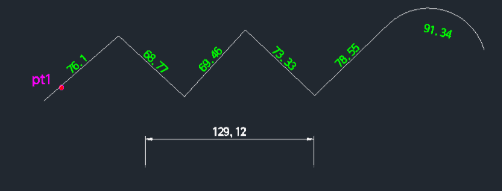
This tool calculates the total length of a selected polyline and displays the value as text near its center.
- Text Height
- The size of the text is determined by multiplying the dimtxt (dimension text height) and dimscale (dimension scale) system variables. You can adjust either of these variables to change the text size.
How to use
The length of the polyline is automatically calculated and placed as text near the center line of the object.
- 1.Type pltxt in the command line and press Enter.
- 2.Select the Polyline you want to measure.
Example
Included free
All 401 LISP utilities come free with every Cadopilar license.
Purchase any Cadopilar license and our team will install the complete suite for you. No additional charge, no setup headaches.
Contact us to get started →