Description
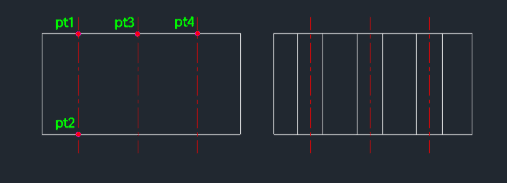
This tool continuously draws through-hole section lines (often used for indicating drilled holes in a cross-sectional view).
- Repetition
- Allows you to place multiple instances of the same hole specification in sequence without restarting the command.
- Input
- Requires defining the center and end points for the first hole, entering the diameter, and then simply clicking subsequent center points to place copies.
How to use
- 1.Type htx in the command line and press Enter.
- 2.Click the Center Point (PT1) of the first hole.
- 3.Click the End Point (PT2) to define the hole's length/direction.
- 4.Enter the Hole Diameter.
- 5.Click subsequent Center Points (PT3, PT4, etc.) to place additional holes of the same size.
- 6.Press Esc to exit the command.
Example
Included free
All 401 LISP utilities come free with every Cadopilar license.
Purchase any Cadopilar license and our team will install the complete suite for you. No additional charge, no setup headaches.
Contact us to get started →