LISP Utilities
PATPAT.ELFExtract Area by Point & Create Table
Generates area tables by boundary detection.
Description
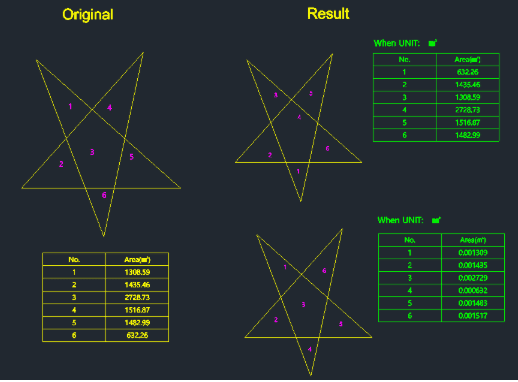
This tool calculates the area of closed regions by simply clicking a point inside them, then automatically labels them with sequence numbers and generates a summary table.
- Area Table Generation
- It creates a table listing the index numbers and their corresponding area values based on your selection order.
- Unit & Precision Control
- You can choose between square millimeters ($mm^2$) or square meters ($m^2$) and define the number of decimal places for the output.
How to use
- 1.Type pat in the command line and press Enter.
- 2.Select the Unit (Type 1 for $mm^2$ or 2 for $m^2$) and press Enter.
- 3.Enter the number of decimal places and press Enter.
- 4.Click inside the closed regions (internal points) you want to measure one by one.
- 5.Press Enter to finish selection, then click the Top-Left point where you want the table to be drawn.
Example
Included free
All 401 LISP utilities come free with every Cadopilar license.
Purchase any Cadopilar license and our team will install the complete suite for you. No additional charge, no setup headaches.
Contact us to get started →