LISP Utilities
CDATACDATA.ELFCircle Coordinate & Diameter Table (Hole Chart) Generator
Generates hole charts from circles.
Description
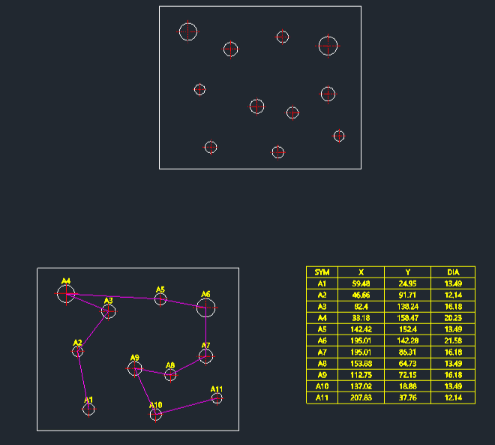
This tool extracts the center coordinates and diameters of selected circles to automatically generate a hole chart table and visualize the machining path.
- Hole Chart Generation
- Creates a table listing the hole index, X/Y location relative to a specified origin, and diameter, while also displaying the shortest processing path.
- Customizable Output
- You can define the coordinate origin, numbering prefix (e.g., A1), and decimal precision, with the table size controlled by DIMSCALE.
How to use
- 1.Type cdata in the command line and press Enter.
- 2.Enter the decimal precision, pick a Reference Point (Origin), and set the Prefix (e.g., "A").
- 3.Click the Top-Left point for the table location.
- 4.Select the circles to process and press Enter.
Example
Included free
All 401 LISP utilities come free with every Cadopilar license.
Purchase any Cadopilar license and our team will install the complete suite for you. No additional charge, no setup headaches.
Contact us to get started →