Description
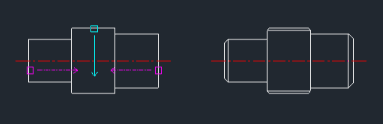
This is an improved version of the previous shaft chamfer tool. It automatically creates a chamfer on a shaft end and draws the closing vertical or horizontal line in a single operation.
- One-Step Finishing
- Unlike standard chamfering, this tool closes the geometry (drawing the line across the chamfered end) instantly.
- Enhanced Convenience
- It is designed to be faster and easier to use than the original ASC command.
How to use
The chamfer is applied, and the end line is automatically drawn to finish the shaft detail.
- 1.Type asc2 in the command line and press Enter.
- 2.Select the line you want to chamfer.
- 3.Click a point to define the direction of the chamfer.
- 4.Enter the chamfer distance value and press Enter.
Example
Included free
All 401 LISP utilities come free with every Cadopilar license.
Purchase any Cadopilar license and our team will install the complete suite for you. No additional charge, no setup headaches.
Contact us to get started →