LISP Utilities
MHTMHT.ELFDraw Through-Hole at Midpoint
Generates through-holes at geometric midpoints.
Description
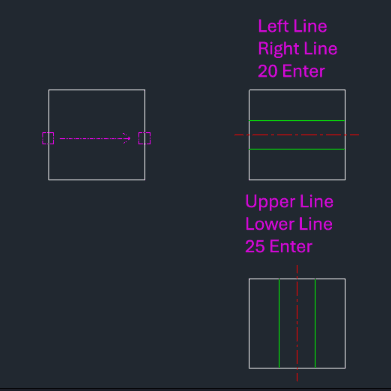
This tool automatically draws a through-hole (including the centerline) centered between two selected parallel lines.
- Midpoint Calculation
- It finds the midpoint between two selected lines (e.g., left and right sides of a plate) and places the hole exactly in the center.
- Automatic Centerline
- Along with the hole boundaries, it automatically draws the centerline for the hole.
How to use
The through-hole and its centerline are drawn horizontally or vertically between the selected lines.
- 1.Type mht in the command line and press Enter.
- 2.Click the First Line (e.g., Left side).
- 3.Click the Second Line (e.g., Right side).
- 4.Enter the Diameter (or width) of the hole and press Enter.
Example
Included free
All 401 LISP utilities come free with every Cadopilar license.
Purchase any Cadopilar license and our team will install the complete suite for you. No additional charge, no setup headaches.
Contact us to get started →