LISP Utilities
ECUTECUT.ELFCut Rectangular Notch at Midpoint
Generates rectangular cutouts at geometric midpoints.
Description
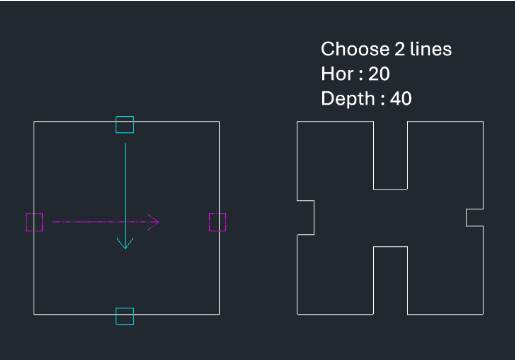
This tool creates a rectangular notch (cutout) exactly at the midpoint of a selected line.
- Midpoint Notch
- It calculates the center of the selected line and creates a rectangular cutout based on specified dimensions.
- Direction Control
- You can specify the direction of the cut (inward or outward) by clicking a point relative to the line.
How to use
- 1.Type ecut in the command line and press Enter.
- 2.Select the line you want to cut.
- 3.Click a point to indicate the direction for the notch.
- 4.Enter the width of the notch and press Enter.
- 5.Enter the depth of the notch and press Enter.
Example
Included free
All 401 LISP utilities come free with every Cadopilar license.
Purchase any Cadopilar license and our team will install the complete suite for you. No additional charge, no setup headaches.
Contact us to get started →