Description
This tool simplifies the process of drawing the plan view of a support bracket or plate.
- Parametric Drawing
- It allows you to create the geometry by simply entering dimensions such as width, thickness, and various segment lengths.
- Automatic Mirroring
- Once the half-profile is defined, selecting a center line automatically mirrors the geometry to complete the symmetric shape.
How to use
- 1.Type PLTOP in the command line and press Enter.
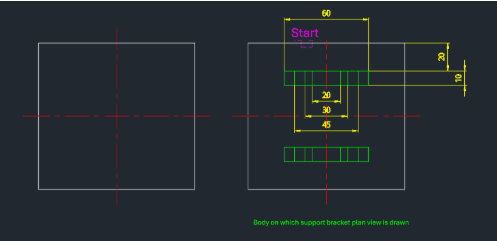
- 2.Select the Top Outer Line and click a point to define the direction (e.g., downwards).
- 3.Enter the specific segment distances (e.g., 20, 30, 45).
- 4.Type 0 and press Enter to finish entering distances.
- 5.Select the Center Line (Symmetry Line) to mirror and finish the drawing.
- Enter the dimensions in sequence
- Offset Distance (e.g., 20), Total Width (e.g., 60), and Material Thickness (e.g., 10).
Example
Included free
All 401 LISP utilities come free with every Cadopilar license.
Purchase any Cadopilar license and our team will install the complete suite for you. No additional charge, no setup headaches.
Contact us to get started →