Description
This tool automatically draws a knurling pattern (a diamond-shaped cross-hatch texture), which is commonly used in mechanical drawings to indicate a rough surface for gripping (e.g., on handles or knobs).
- Function
- It simplifies the representation of knurling by automatically filling a specified rectangular area with the standard hatch pattern.
- Menu Status
- This command has not yet been added to the standard menu.
How to use
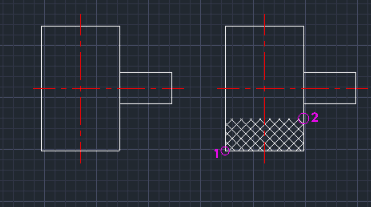
The knurling pattern is automatically generated within the defined rectangular area.
- 1.Type NUL in the command line and press Enter.
- 2.Click the First Point (e.g., the bottom-left corner of the area to be knurled).
- 3.Click the Second Point (e.g., the top-right corner of the area).
Example
Included free
All 401 LISP utilities come free with every Cadopilar license.
Purchase any Cadopilar license and our team will install the complete suite for you. No additional charge, no setup headaches.
Contact us to get started →