LISP Utilities
4CBR4cbr.elfDraw Filleted Plate (4 C-Bores)
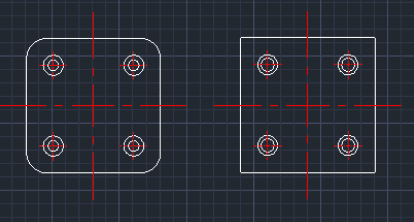
Generates a rectangular plate with filleted corners and four counterbores
Description
This tool automatically draws a rectangular plate (with optional rounded corners) containing four counterbore holes (plan view).
- Function
- It is useful in mechanical design for quickly drawing base plates or mounting plates that require corner mounting holes with specific counterbore dimensions.
- Flexibility
- You can define the plate size, corner radius (input 0 for a sharp rectangle), hole positions relative to the edges, and the diameters of the counterbore.
- Compatibility
- This is a dedicated Cadopilar Lisp tool and works only within Cadopilar.
How to use
The plate with the specified dimensions and holes is automatically drawn.
- 1.Type 4CBR in the command line and press Enter.
- 2.Click the Center Point of the plate.
- 3.Enter the Plate Width (Horizontal length).
- 4.Enter the Plate Height (Vertical length).
- 5.Enter the Corner Rounding Radius (Enter 0 for a standard rectangle).
- 6.Enter the X Distance (Horizontal distance from the plate edge to the hole center).
- 7.Enter the Y Distance (Vertical distance from the plate edge to the hole center).
- 8.Enter the First Diameter of the counterbore.
- 9.Enter the Second Diameter of the counterbore.
Example
Included free
All 401 LISP utilities come free with every Cadopilar license.
Purchase any Cadopilar license and our team will install the complete suite for you. No additional charge, no setup headaches.
Contact us to get started →