Description
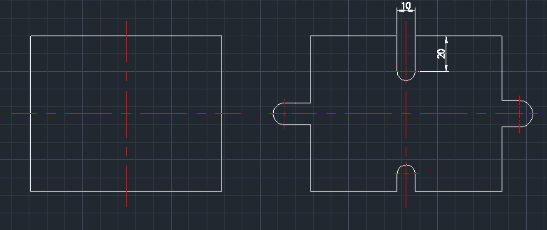
This tool creates an arc-shaped cutout (semi-circle hole) at the end of an object.
- Function
- It is designed to quickly draw arc-shaped notches or protrusions at the edge of a shape.
- Flexibility
- As indicated in the description, it can create shapes that cut inwards or protrude outwards depending on the input.
- Compatibility
- This is a dedicated Cadopilar Lisp tool and works only within Cadopilar.
How to use
The arc shape is automatically drawn based on these dimensions.
- 1.Type HARC in the command line and press Enter.
- 2.Click the Start Center Point where the arc will begin.
- 3.Click a point to define the Direction of the arc.
- 4.Enter the Width value.
- 5.Enter the Vertical (Depth) value.
Example
Included free
All 401 LISP utilities come free with every Cadopilar license.
Purchase any Cadopilar license and our team will install the complete suite for you. No additional charge, no setup headaches.
Contact us to get started →